Build Dedicated VPU-Based Video Infrastructure

Netint VPU Ecosystem graphic featuring a modern cable-stayed bridge with the headline “Build Dedicated VPU-Based Video Infrastructure.”

Some infrastructure decisions are temporary. Others become the foundation. When video processing is central to the business, the strongest move is to build the system around video from the start.

NETINT VPU ECOSYSTEM · IBC 2026

AT A GLANCE

Dedicated VPU Video Infrastructure gives organizations complete control over long-term video processing deployments. By designing systems around real workloads instead of generic hardware, teams can optimize density, power efficiency, scalability, and operational reliability.

This article explains how to select the right Quadra VPU, validated system, and Bitstreams software layer to build scalable video processing infrastructure that matches production requirements.

Hosted capacity helps when deployment speed is the immediate issue. Existing servers can sometimes be reused when the environment is suitable. Dedicated VPU infrastructure is for teams that want control: to own the hardware, standardize the deployment, and build capacity they expect to operate for years.

That means choosing infrastructure based on the actual workload. Codecs, resolutions, latency targets, density requirements, power limits, and the operating model all point to the right design. The direct NETINT path is to choose the right VPU, place it in the right system, control it with the right software, and scale from a known architecture.

Start with the workload

A dedicated system should be designed around the video it will run every day. A live platform cares most about real-time performance, predictable latency, and stream stability. A user-generated or short-form platform cares about high-volume transcoding, cost per output, and density. A broadcaster or event team may need compact systems for onsite, edge, or mobile use.

Those workloads call for different choices. Codec support, output ladder, resolution mix, input format, latency target, throughput, location, and operating model all shape the right product path. The decision should start with the video requirement, not the part number.

Start with the video requirement, not the part number.
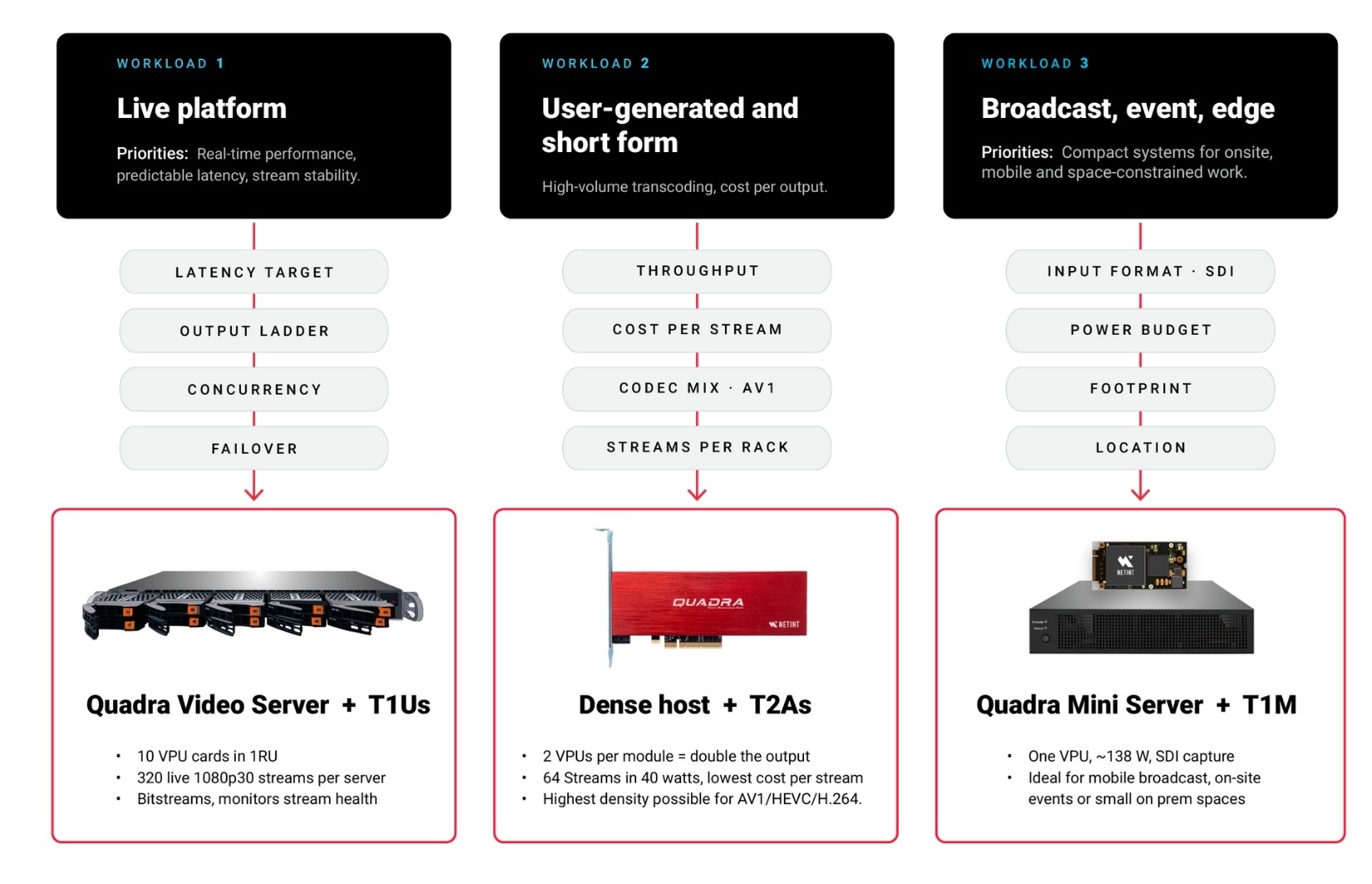
Diagram showing a dedicated video infrastructure stack with Bitstreams software, Quadra 1RU encoding servers, and Quadra VPUs. An arrow leads to multiple identical server units, illustrating how capacity can be increased by adding another unit.

Figure 1. The video requirement points to the product path. Start with the workload, then choose the silicon, system, and software that match it.

Choose the silicon: Quadra VPUs

The Quadra family is the core of the dedicated story, with four form factors built on NETINT’s Codensity G5 ASIC and a shared software stack across FFmpeg, GStreamer, and the SDK. The T1M is the compact M.2 part for edge, embedded, and space-constrained designs at roughly 8 to 10 watts. The T1U is the U.2 scale-out option at about 17 watts, handling on the order of 32 live 1080p30 streams per card.

The T1A is the PCIe add-in card for server-based deployments where power, thermals, and tuning matter most. The T2A is the density path, a dual-ASIC card that maximizes output per server and lowers cost per stream in high-volume environments. The decision should start with the system design: form factor, how many VPUs must fit, the realistic power budget, available airflow, and the codecs and resolutions required.

The server stays. The encoding work moves off the CPU.
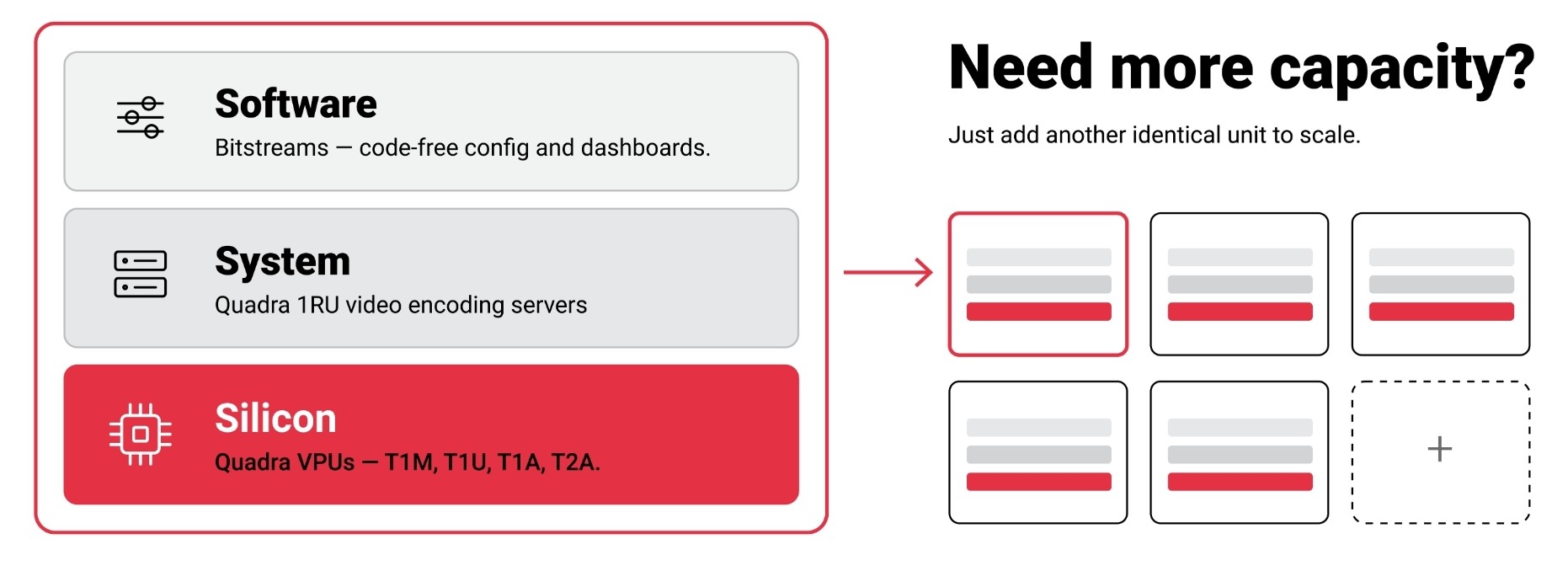
Diagram comparing three video workloads: live platforms, user-generated and short-form video, and broadcast/event/edge applications. Each workload maps performance priorities and requirements to a recommended NETINT configuration, including Quadra Video Server with T1Us, dense hosts with T2As, and Quadra Mini Server with T1M.

Figure 2. One architecture, three layers. Silicon, system, and a software control layer combine into a known, repeatable capacity unit.

Choose the system, then the control layer

A VPU provides the processing engine, not the whole system. The host still has to support the deployment physically, electrically, thermally, and operationally, which is why dedicated infrastructure is an architecture decision rather than a card installation. Anyone can put a card in a server and run a test. Production is different: it means sustained workloads, predictable stream behavior, monitoring, failover planning, and a repeatable path for adding capacity. The goal is a known-good configuration that becomes the building block for future capacity.

For teams that do not want to engineer a server from components, the Quadra Video Server provides a validated, high-density multi-VPU platform, with around ten T1U cards in a 1RU chassis supporting up to roughly 320 live 1080p30 streams. For compact, onsite, edge, or mobile work, the Quadra Mini Server packages a single T1M into a small system at about 138 watts with SDI capture.

Hardware alone does not make a deployment manageable. Bitstreams is NETINT’s control and automation layer, turning VPU hardware into a deployable platform with code-free FFmpeg configuration, reusable templates, and dashboards for stream health and system load. It matters because operational problems usually have to be solved alongside processing problems.

Engineers can always work directly with FFmpeg, GStreamer, SDKs, and APIs. But many production deployments still need a practical way to configure, observe, and repeat encoding workflows without rebuilding them by hand. Bitstreams is most useful when a team wants a managed VPU workflow rather than a purely low-level integration, so it can see what is running, whether streams are healthy, and how capacity is being used.

A dedicated deployment is rarely just one product. A team may have the server but need the software layer, or have the workflow software but need validated hardware, or need cloud capacity, integration, transport, or monitoring around the VPU. This is where the broader ecosystem completes the system: hardware partners such as Advantech, integration partners such as Arcadian, and hosted capacity when a region or a deadline demands it.

Dedicated VPU infrastructure is the clearest and longest-lived path for teams that want to own and control their video processing. When the workload is clear, permanent, and central to the business, designing the system around video from the beginning gives the most control over density, power, performance, and operations.

Ecosystem fills the deployment gaps
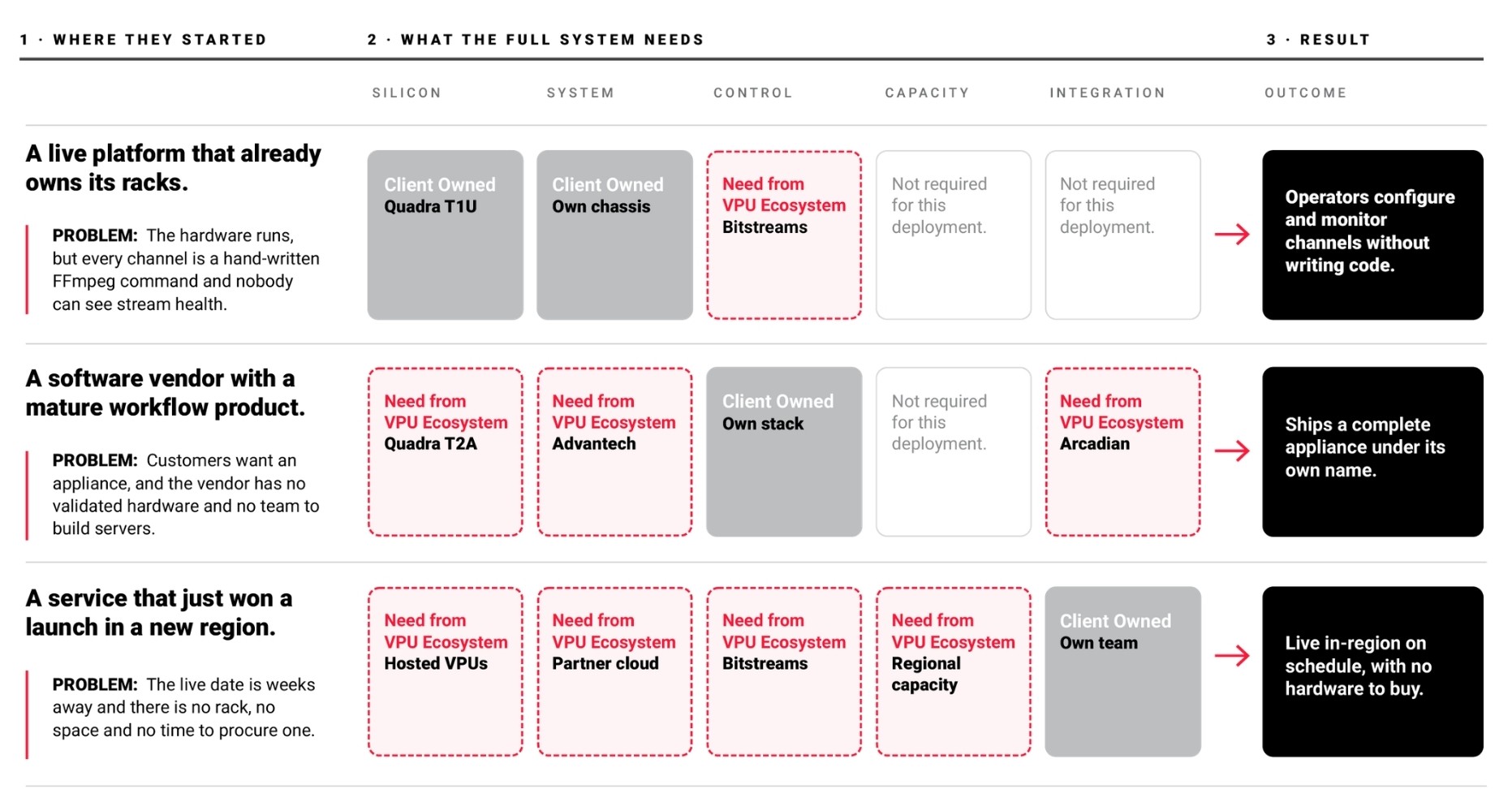
Diagram showing three customer scenarios and how existing client-owned infrastructure combines with VPU ecosystem components such as Quadra hardware, Bitstreams, Advantech systems, Arcadian integration, hosted VPUs, partner cloud, and regional capacity to deliver complete video infrastructure solutions.

Sources & further reading

NETINT, VPU products (Quadra family specifications). https://netint.com/products/

NETINT, Bitstreams control and automation layer. https://netint.com/bitstreams/

NETINT, Quadra Mini Server (Apr 2025). https://netint.com/quadra-mini-server-empowering-the-next-generation-of-video-streaming-workflows/

NETINT VPU ECOSYSTEM · IBC 2026 

As video workloads continue to grow, adding capacity is no longer a single decision, but a set of practical paths depending on the real bottleneck. This series explores how to scale video processing efficiently using NETINT VPUs, whether through infrastructure partners, existing systems, or dedicated deployments designed around video from the start.

1. The New Video Capacity Problem

2. Three Ways to Add Video Capacity

3. VPU-Powered Capacity as a Service

4. Get More from the Servers You Already Own

5. Build Dedicated VPU-Based Video Infrastructure.

6. VPU Capacity Without a Hardware Cycle

7. Scaling Performance-Critical Video Workloads

Coming soon:

8. Building Practical VPU-Based Video Systems

9. Reliable Live Video Meets Efficient Processing

10. Maximizing Encoding Efficiency in Live Streaming Workflows

11. The Next Layer of Video Efficiency

12. From VPU Evaluation to Production Deployment
Build Dedicated VPU-Based Video Infrastructure

Build Dedicated VPU Video Infrastructure with Quadra VPUs, validated systems, and Bitstreams to create scalable video processing platforms.

Netint VPU Ecosystem graphic featuring a modern cable-stayed bridge with the headline “Build Dedicated VPU-Based Video Infrastructure.”

Some infrastructure decisions are temporary. Others become the foundation. When video processing is central to the business, the strongest move is to build the system around video from the start.

NETINT VPU ECOSYSTEM · IBC 2026

AT A GLANCE

Dedicated VPU Video Infrastructure gives organizations complete control over long-term video processing deployments. By designing systems around real workloads instead of generic hardware, teams can optimize density, power efficiency, scalability, and operational reliability.

This article explains how to select the right Quadra VPU, validated system, and Bitstreams software layer to build scalable video processing infrastructure that matches production requirements.

Hosted capacity helps when deployment speed is the immediate issue. Existing servers can sometimes be reused when the environment is suitable. Dedicated VPU infrastructure is for teams that want control: to own the hardware, standardize the deployment, and build capacity they expect to operate for years.

That means choosing infrastructure based on the actual workload. Codecs, resolutions, latency targets, density requirements, power limits, and the operating model all point to the right design. The direct NETINT path is to choose the right VPU, place it in the right system, control it with the right software, and scale from a known architecture.

Start with the workload

A dedicated system should be designed around the video it will run every day. A live platform cares most about real-time performance, predictable latency, and stream stability. A user-generated or short-form platform cares about high-volume transcoding, cost per output, and density. A broadcaster or event team may need compact systems for onsite, edge, or mobile use.

Those workloads call for different choices. Codec support, output ladder, resolution mix, input format, latency target, throughput, location, and operating model all shape the right product path. The decision should start with the video requirement, not the part number.

Start with the video requirement, not the part number.

Diagram showing a dedicated video infrastructure stack with Bitstreams software, Quadra 1RU encoding servers, and Quadra VPUs. An arrow leads to multiple identical server units, illustrating how capacity can be increased by adding another unit.

Figure 1. The video requirement points to the product path. Start with the workload, then choose the silicon, system, and software that match it.

Choose the silicon: Quadra VPUs

The Quadra family is the core of the dedicated story, with four form factors built on NETINT’s Codensity G5 ASIC and a shared software stack across FFmpeg, GStreamer, and the SDK. The T1M is the compact M.2 part for edge, embedded, and space-constrained designs at roughly 8 to 10 watts. The T1U is the U.2 scale-out option at about 17 watts, handling on the order of 32 live 1080p30 streams per card.

The T1A is the PCIe add-in card for server-based deployments where power, thermals, and tuning matter most. The T2A is the density path, a dual-ASIC card that maximizes output per server and lowers cost per stream in high-volume environments. The decision should start with the system design: form factor, how many VPUs must fit, the realistic power budget, available airflow, and the codecs and resolutions required.

The server stays. The encoding work moves off the CPU.

Diagram comparing three video workloads: live platforms, user-generated and short-form video, and broadcast/event/edge applications. Each workload maps performance priorities and requirements to a recommended NETINT configuration, including Quadra Video Server with T1Us, dense hosts with T2As, and Quadra Mini Server with T1M.

Figure 2. One architecture, three layers. Silicon, system, and a software control layer combine into a known, repeatable capacity unit.

Choose the system, then the control layer

A VPU provides the processing engine, not the whole system. The host still has to support the deployment physically, electrically, thermally, and operationally, which is why dedicated infrastructure is an architecture decision rather than a card installation. Anyone can put a card in a server and run a test. Production is different: it means sustained workloads, predictable stream behavior, monitoring, failover planning, and a repeatable path for adding capacity. The goal is a known-good configuration that becomes the building block for future capacity.

For teams that do not want to engineer a server from components, the Quadra Video Server provides a validated, high-density multi-VPU platform, with around ten T1U cards in a 1RU chassis supporting up to roughly 320 live 1080p30 streams. For compact, onsite, edge, or mobile work, the Quadra Mini Server packages a single T1M into a small system at about 138 watts with SDI capture.

Hardware alone does not make a deployment manageable. Bitstreams is NETINT’s control and automation layer, turning VPU hardware into a deployable platform with code-free FFmpeg configuration, reusable templates, and dashboards for stream health and system load. It matters because operational problems usually have to be solved alongside processing problems.

Engineers can always work directly with FFmpeg, GStreamer, SDKs, and APIs. But many production deployments still need a practical way to configure, observe, and repeat encoding workflows without rebuilding them by hand. Bitstreams is most useful when a team wants a managed VPU workflow rather than a purely low-level integration, so it can see what is running, whether streams are healthy, and how capacity is being used.

A dedicated deployment is rarely just one product. A team may have the server but need the software layer, or have the workflow software but need validated hardware, or need cloud capacity, integration, transport, or monitoring around the VPU. This is where the broader ecosystem completes the system: hardware partners such as Advantech, integration partners such as Arcadian, and hosted capacity when a region or a deadline demands it.

Dedicated VPU infrastructure is the clearest and longest-lived path for teams that want to own and control their video processing. When the workload is clear, permanent, and central to the business, designing the system around video from the beginning gives the most control over density, power, performance, and operations.

Ecosystem fills the deployment gaps

Diagram showing three customer scenarios and how existing client-owned infrastructure combines with VPU ecosystem components such as Quadra hardware, Bitstreams, Advantech systems, Arcadian integration, hosted VPUs, partner cloud, and regional capacity to deliver complete video infrastructure solutions.

Sources & further reading

NETINT, VPU products (Quadra family specifications). https://netint.com/products/

NETINT, Bitstreams control and automation layer. https://netint.com/bitstreams/

NETINT, Quadra Mini Server (Apr 2025). https://netint.com/quadra-mini-server-empowering-the-next-generation-of-video-streaming-workflows/

NETINT VPU ECOSYSTEM · IBC 2026 

As video workloads continue to grow, adding capacity is no longer a single decision, but a set of practical paths depending on the real bottleneck. This series explores how to scale video processing efficiently using NETINT VPUs, whether through infrastructure partners, existing systems, or dedicated deployments designed around video from the start.

1. The New Video Capacity Problem

2. Three Ways to Add Video Capacity

3. VPU-Powered Capacity as a Service

4. Get More from the Servers You Already Own

5. Build Dedicated VPU-Based Video Infrastructure.

6. VPU Capacity Without a Hardware Cycle

7. Scaling Performance-Critical Video Workloads

Coming soon:

8. Building Practical VPU-Based Video Systems

9. Reliable Live Video Meets Efficient Processing

10. Maximizing Encoding Efficiency in Live Streaming Workflows

11. The Next Layer of Video Efficiency

12. From VPU Evaluation to Production Deployment