Encoding Efficiency Is Becoming an Infrastructure Decision

High-performance data center server rack with hardware video encoder or VPU card streaming data, illustrating efficient video transcoding, cloud infrastructure, and scalable media processing technology

Encoders should be evaluated as infrastructure: by sustained throughput, power, density, predictability, and operational cost, not compression quality alone.

At a glance

Video encoding has traditionally been judged by codecs, bitrate ladders, presets, and quality at a given bitrate, but at scale those choices no longer explain the full cost or scalability of a platform. The more consequential question is which compute platform carries the sustained media workload, because encoding efficiency is really streams per server, watts per stream, rack density, and the ability to meet frame deadlines under concurrency.

Encoding cost is usually hidden inside cloud instance hours or server count, power, and cooling, and it compounds as one source becomes many renditions and codecs, so a compression gain can be erased by a poor compute fit. Purpose-built video silicon like a VPU moves the media plane off shared CPU resources and changes the unit of capacity from host utilization to delivered video profiles, while ingest, orchestration, packaging, and delivery stay largely unchanged.

The takeaway is to place the media workload deliberately rather than inherit it from the default server, and to ask first how many compliant streams the system can sustain per server, per watt, and per operational domain, with the encoder decision following from that.

Video encoding strategy has traditionally started with codecs, bitrate ladders, presets, GOP structures, and quality metrics. Those choices still shape the viewer experience. They no longer explain the full cost or scalability of a modern streaming platform. 

The more consequential question is architectural: which compute platform should carry the sustained media workload? At scale, encoding efficiency is measured not only by quality at a given bitrate, but also by streams per server, watts per stream, rack density, operational headroom, and the ability to meet frame deadlines under concurrency.

Encoding cost is often hidden

Encoding rarely appears as a clean line item. In cloud deployments it is buried inside instance hours, accelerated compute, storage, and data movement. In owned infrastructure it appears as server count, rack space, power distribution, cooling, spares, and data center technician time. The cost compounds because a single source often becomes several adaptive-bitrate renditions, sometimes in more than one codec.

A small improvement in compression efficiency can reduce delivery cost, but a poor compute fit can erase the benefit. If a quality setting halves throughput, the platform may need twice as many processing resources. Quality and infrastructure efficiency must be evaluated together.
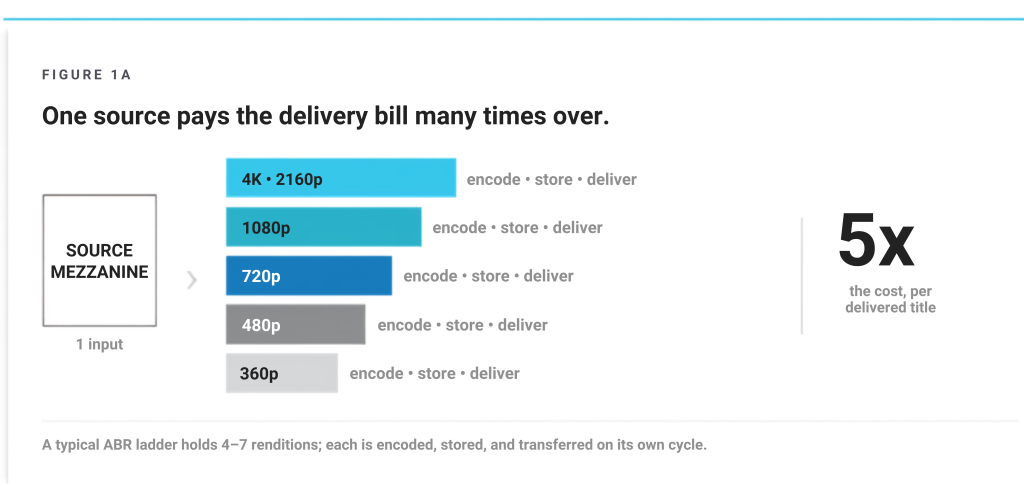
Figure 1A: A single input feeds a source mezzanine and multiple encoded renditions (4K/2160p, 1080p, 720p, 480p, 360p) with encode/store/deliver; 5x cost per delivered title.


Source: NETINT Quadra Product Line Specifications

CPU encoding is a shared-resource model

CPUs are valuable because they are general-purpose processors. They run the operating system, orchestration, application logic, networking, storage, monitoring, and video software. That flexibility is ideal for development and for workloads that are small, irregular, or tightly coupled to other application functions.

The tradeoff appears under sustained concurrency. Every encode competes for cores, cache, memory bandwidth, scheduler attention, and thermal headroom. The system can continue producing output while becoming progressively less economical because engineers must reserve more safety margin to absorb input complexity, background activity, and timing variance. In live workflows, that margin protects against latency growth and dropped frames. In VOD, it protects processing windows and service-level commitments.

Purpose-built video silicon changes the unit of capacity

A Video Processing Unit (VPU) moves encode, decode, scaling, and related media operations to silicon designed for those functions. The host CPU remains responsible for control-plane work, but the continuous frame-processing load no longer consumes the same pool of general-purpose resources.

As an example, the NETINT Quadra T1U draws17 watts and depending on configuration, will encode up to 32 1080p30, eight 4Kp30, or two 8Kp30 streams, using any mix of AV1, HEVC, or H.264. Need 60 frames? Just divide the throughput numbers in half. A 1RU Quadra Video Server with ten T1U VPUs will consume around 500 watts and encode up to 320 1080p30 encodes.[1] Using the published maximums, the complete server works out to roughly 1.6 watts per 1080p30 encode. That is an illustrative ratio, not a guaranteed production result, but it shows why system-level density matters more than the power rating of a single component.
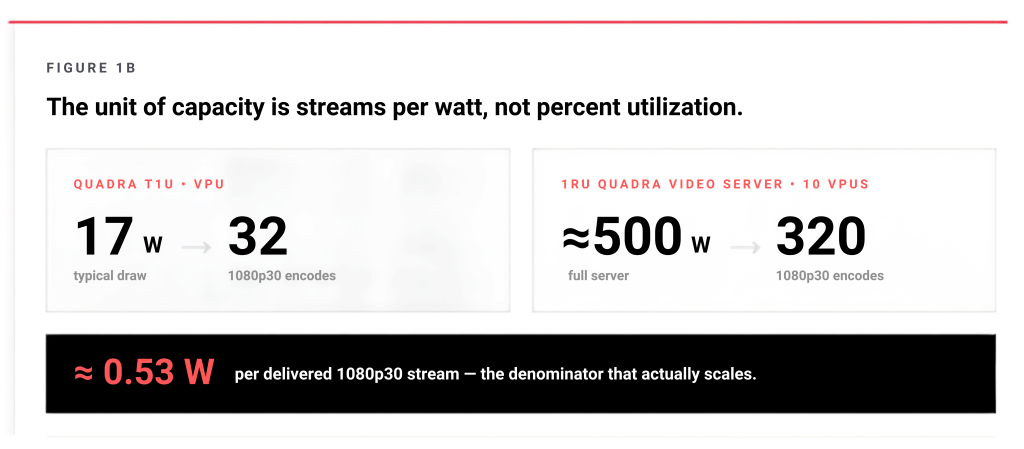
Diagram showing VPU transcoding efficiency measured in streams per watt, comparing Quadra T1U (17W for 32 streams) and a 1RU server (500W for 320 streams), highlighting ~0.53 watts per 1080p30 stream efficiency


Source: NETINT Technologies, Quadra product specifications

Measure useful work, not component utilization
The most useful denominator is a delivered video workload: a channel, rendition, ladder, or transcode profile that meets defined quality and latency requirements. CPU percentage and device power are inputs, not the business outcome.

The workflow can remain familiar

Moving media processing to dedicated hardware does not require replacing the surrounding platform. NETINT exposes Quadra through FFmpeg, GStreamer, and the libxcoder API.[2] In a practical migration, ingest, demuxing, orchestration, packaging, storage, observability, and delivery can remain largely unchanged. The substitution occurs inside the media path, where software decode and encode stages are replaced with hardware-aware components.

That distinction lowers risk. Teams can run CPU and VPU paths in parallel, compare outputs, validate rate control and latency, inspect device utilization, and move traffic gradually. The architecture changes where the heavy work executes, not who owns the pipeline or how the service is operated.

Power efficiency is also a resilience decision

Power consumed by compute becomes heat that the facility must remove. Lower watts per useful stream can reduce cooling load, free rack power for growth, and make it easier to maintain active redundancy within the same electrical envelope. It can also extend the practical reach of edge or regional deployments where power and cooling are more constrained.

This is why encoder tuning cannot solve every efficiency problem. Codec, preset, and rate-control decisions operate inside a compute architecture. If the architecture is poorly matched to sustained video processing, parameter tuning can improve compression but cannot remove the underlying server, power, and operational burden.

Start with workload placement

The correct conclusion is not that every video workload belongs on a VPU. CPUs remain the right choice for many general-purpose and low-volume tasks. GPUs are compelling when video is combined with graphics or broad parallel compute. FPGAs fit pipelines that require custom logic. The point is that the media workload should be placed deliberately rather than inherited from the default server configuration.

Encoding is no longer just one application in the pipeline. For platforms with sustained live channels, large VOD libraries, multiple codecs, or dense adaptive ladders, it is a core infrastructure decision. The first architecture review should therefore ask how many compliant streams the system can sustain per server, per watt, and per operational domain. The encoder decision follows from that.

Technical sources

[1] NETINT, Quadra Product Line Specifications: https://info.netint.com/hubfs/TechnicalSpec/Quadra-T1-T2-T4_TechSpec.pdf
[2] NETINT, Quadra Video Server product page: https://netint.com/products/quadra-video-server/
[3] NETINT, Product and engineering FAQs: https://netint.com/products/

STREAMING ARCHITECTURE & ENCODING EFFICIENCY | Stockholm Technical Series 

NETINT and SCALSTRM brought together video engineering and infrastructure professionals in Stockholm for a practical discussion on encoding efficiency, hardware acceleration, cost, power, and live workflow design. This article series captures the key technical themes from the event, from silicon architecture and CPU vs VPU performance to FFmpeg integration and carrier-grade live workflows. 

    1. Encoding Efficiency Is Becoming an Infrastructure Decision (What We Learned in Stockholm) 
    2. Stop Asking Which Encoder. Start Asking Which Silicon. 
    3. How Video Encoding Actually Runs
    4. VPU Migration Without Rebuilding Your Video Pipeline
    5. From libx265 to h265_ni_quadra_enc
    6. From VPU Acceleration to Carrier-Grade Live Workflows
    7. Encoding Efficiency, Power, and Resilience in Nordic Streaming Infrastructure 
Encoding Efficiency Is Becoming an Infrastructure Decision

High-performance data center server rack with hardware video encoder or VPU card streaming data, illustrating efficient video transcoding, cloud infrastructure, and scalable media processing technology

Encoders should be evaluated as infrastructure: by sustained throughput, power, density, predictability, and operational cost, not compression quality alone.

At a glance

Video encoding has traditionally been judged by codecs, bitrate ladders, presets, and quality at a given bitrate, but at scale those choices no longer explain the full cost or scalability of a platform. The more consequential question is which compute platform carries the sustained media workload, because encoding efficiency is really streams per server, watts per stream, rack density, and the ability to meet frame deadlines under concurrency.

Encoding cost is usually hidden inside cloud instance hours or server count, power, and cooling, and it compounds as one source becomes many renditions and codecs, so a compression gain can be erased by a poor compute fit. Purpose-built video silicon like a VPU moves the media plane off shared CPU resources and changes the unit of capacity from host utilization to delivered video profiles, while ingest, orchestration, packaging, and delivery stay largely unchanged.

The takeaway is to place the media workload deliberately rather than inherit it from the default server, and to ask first how many compliant streams the system can sustain per server, per watt, and per operational domain, with the encoder decision following from that.

Video encoding strategy has traditionally started with codecs, bitrate ladders, presets, GOP structures, and quality metrics. Those choices still shape the viewer experience. They no longer explain the full cost or scalability of a modern streaming platform. 

The more consequential question is architectural: which compute platform should carry the sustained media workload? At scale, encoding efficiency is measured not only by quality at a given bitrate, but also by streams per server, watts per stream, rack density, operational headroom, and the ability to meet frame deadlines under concurrency.

Encoding cost is often hidden

Encoding rarely appears as a clean line item. In cloud deployments it is buried inside instance hours, accelerated compute, storage, and data movement. In owned infrastructure it appears as server count, rack space, power distribution, cooling, spares, and data center technician time. The cost compounds because a single source often becomes several adaptive-bitrate renditions, sometimes in more than one codec.

A small improvement in compression efficiency can reduce delivery cost, but a poor compute fit can erase the benefit. If a quality setting halves throughput, the platform may need twice as many processing resources. Quality and infrastructure efficiency must be evaluated together.

Figure 1A: A single input feeds a source mezzanine and multiple encoded renditions (4K/2160p, 1080p, 720p, 480p, 360p) with encode/store/deliver; 5x cost per delivered title.


Source: NETINT Quadra Product Line Specifications

CPU encoding is a shared-resource model

CPUs are valuable because they are general-purpose processors. They run the operating system, orchestration, application logic, networking, storage, monitoring, and video software. That flexibility is ideal for development and for workloads that are small, irregular, or tightly coupled to other application functions.

The tradeoff appears under sustained concurrency. Every encode competes for cores, cache, memory bandwidth, scheduler attention, and thermal headroom. The system can continue producing output while becoming progressively less economical because engineers must reserve more safety margin to absorb input complexity, background activity, and timing variance. In live workflows, that margin protects against latency growth and dropped frames. In VOD, it protects processing windows and service-level commitments.

Purpose-built video silicon changes the unit of capacity

A Video Processing Unit (VPU) moves encode, decode, scaling, and related media operations to silicon designed for those functions. The host CPU remains responsible for control-plane work, but the continuous frame-processing load no longer consumes the same pool of general-purpose resources.

As an example, the NETINT Quadra T1U draws17 watts and depending on configuration, will encode up to 32 1080p30, eight 4Kp30, or two 8Kp30 streams, using any mix of AV1, HEVC, or H.264. Need 60 frames? Just divide the throughput numbers in half. A 1RU Quadra Video Server with ten T1U VPUs will consume around 500 watts and encode up to 320 1080p30 encodes.[1] Using the published maximums, the complete server works out to roughly 1.6 watts per 1080p30 encode. That is an illustrative ratio, not a guaranteed production result, but it shows why system-level density matters more than the power rating of a single component.

Diagram showing VPU transcoding efficiency measured in streams per watt, comparing Quadra T1U (17W for 32 streams) and a 1RU server (500W for 320 streams), highlighting ~0.53 watts per 1080p30 stream efficiency


Source: NETINT Technologies, Quadra product specifications

Measure useful work, not component utilization
The most useful denominator is a delivered video workload: a channel, rendition, ladder, or transcode profile that meets defined quality and latency requirements. CPU percentage and device power are inputs, not the business outcome.

The workflow can remain familiar

Moving media processing to dedicated hardware does not require replacing the surrounding platform. NETINT exposes Quadra through FFmpeg, GStreamer, and the libxcoder API.[2] In a practical migration, ingest, demuxing, orchestration, packaging, storage, observability, and delivery can remain largely unchanged. The substitution occurs inside the media path, where software decode and encode stages are replaced with hardware-aware components.

That distinction lowers risk. Teams can run CPU and VPU paths in parallel, compare outputs, validate rate control and latency, inspect device utilization, and move traffic gradually. The architecture changes where the heavy work executes, not who owns the pipeline or how the service is operated.

Power efficiency is also a resilience decision

Power consumed by compute becomes heat that the facility must remove. Lower watts per useful stream can reduce cooling load, free rack power for growth, and make it easier to maintain active redundancy within the same electrical envelope. It can also extend the practical reach of edge or regional deployments where power and cooling are more constrained.

This is why encoder tuning cannot solve every efficiency problem. Codec, preset, and rate-control decisions operate inside a compute architecture. If the architecture is poorly matched to sustained video processing, parameter tuning can improve compression but cannot remove the underlying server, power, and operational burden.

Start with workload placement

The correct conclusion is not that every video workload belongs on a VPU. CPUs remain the right choice for many general-purpose and low-volume tasks. GPUs are compelling when video is combined with graphics or broad parallel compute. FPGAs fit pipelines that require custom logic. The point is that the media workload should be placed deliberately rather than inherited from the default server configuration.

Encoding is no longer just one application in the pipeline. For platforms with sustained live channels, large VOD libraries, multiple codecs, or dense adaptive ladders, it is a core infrastructure decision. The first architecture review should therefore ask how many compliant streams the system can sustain per server, per watt, and per operational domain. The encoder decision follows from that.

Technical sources

[1] NETINT, Quadra Product Line Specifications: https://info.netint.com/hubfs/TechnicalSpec/Quadra-T1-T2-T4_TechSpec.pdf
[2] NETINT, Quadra Video Server product page: https://netint.com/products/quadra-video-server/
[3] NETINT, Product and engineering FAQs: https://netint.com/products/

STREAMING ARCHITECTURE & ENCODING EFFICIENCY | Stockholm Technical Series 

NETINT and SCALSTRM brought together video engineering and infrastructure professionals in Stockholm for a practical discussion on encoding efficiency, hardware acceleration, cost, power, and live workflow design. This article series captures the key technical themes from the event, from silicon architecture and CPU vs VPU performance to FFmpeg integration and carrier-grade live workflows. 

    1. Encoding Efficiency Is Becoming an Infrastructure Decision (What We Learned in Stockholm) 
    2. Stop Asking Which Encoder. Start Asking Which Silicon. 
    3. How Video Encoding Actually Runs
    4. VPU Migration Without Rebuilding Your Video Pipeline
    5. From libx265 to h265_ni_quadra_enc
    6. From VPU Acceleration to Carrier-Grade Live Workflows
    7. Encoding Efficiency, Power, and Resilience in Nordic Streaming Infrastructure