When more encoding capacity is needed, buying servers is the instinct. It should not be the only option. In a constrained market, the infrastructure already in the rack deserves a second look.
NETINT VPU ECOSYSTEM · IBC 2026
AT A GLANCE
Many organizations can get more from their existing servers before investing in new infrastructure. By adding dedicated VPU acceleration, existing servers can deliver higher encoding capacity, improved video processing efficiency, and greater infrastructure value without a complete hardware refresh.
This article explains how to evaluate existing servers for reuse, validate them for production workloads, and determine when upgrading current infrastructure is a smarter alternative to purchasing new servers.
Many organizations are sitting on servers that are underused, aging, or no longer assigned to business-critical work. Some are waiting to be decommissioned. For general-purpose compute they may be past their prime, but for video processing that assumption can be wrong.
Encoding and transcoding do not have to depend on the CPU. When a server can host dedicated video acceleration, its usefulness changes. A system that struggles with CPU-heavy workloads can still support high-density video processing once it is paired with a NETINT VPU.
The server still matters, but the workload changes
A VPU does not make server design irrelevant. The host still has to provide the right physical, electrical, thermal, and software environment. What changes is the performance equation, because video processing moves off the CPU and onto a dedicated accelerator.
In a CPU-only model, older servers often cannot deliver the density or power efficiency modern video demands. With a VPU handling encode and transcode, the CPU, memory, storage, and network still matter, but they no longer carry the full video burden. That is what can make selected existing servers useful again, especially when a team has rack space and growing demand but does not want to wait for a full refresh.
The server stays. The encoding work moves off the CPU
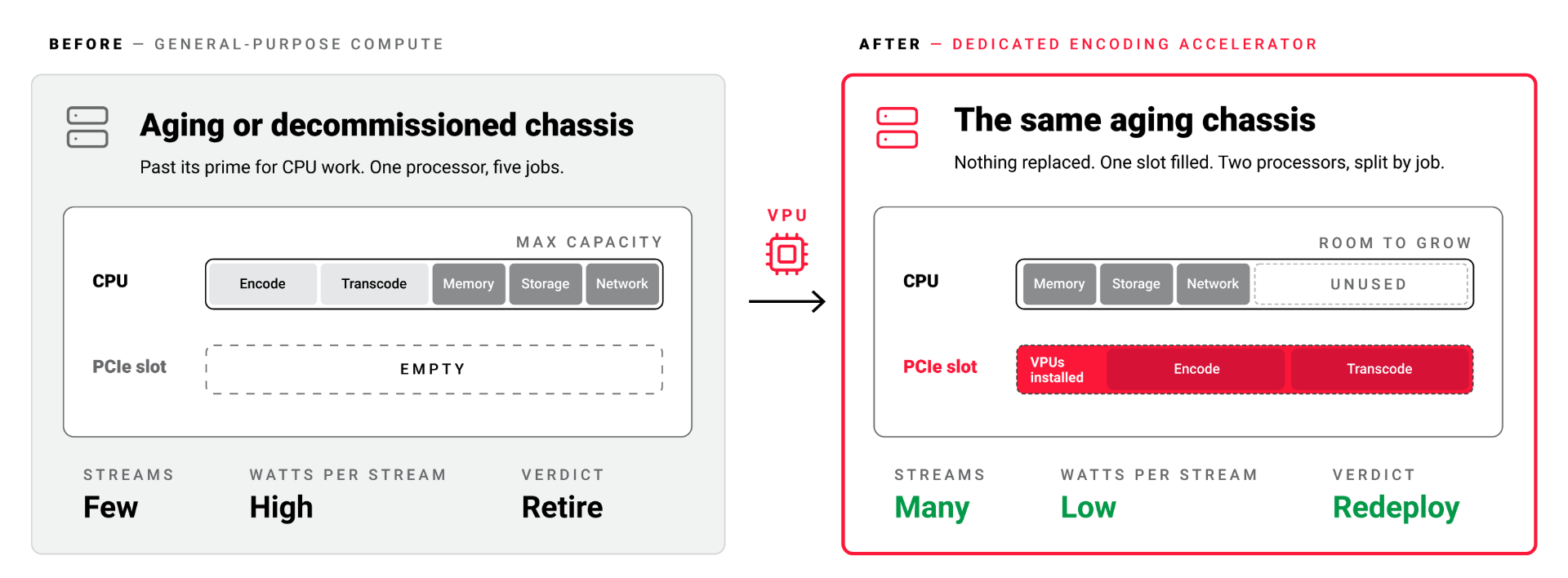
Figure 1. A second life. An idle or aging host plus a NETINT VPU becomes a dedicated, high-density encoding node.
Reuse requires validation
This has to be handled carefully. An open PCIe slot does not make a server production-ready. Live video workloads run for long periods, generate heat, and demand predictable behavior, so the host has to be tested for the conditions it will actually face.
Before committing, validate the basics: PCIe slot and lane availability, airflow over the card, power headroom, thermal behavior under sustained load, BIOS settings, operating system support, driver compatibility, monitoring, and workflow integration. If the server passes, it joins the capacity plan. If it does not, the evaluation still pays off by pointing toward a different server, a dedicated system, or a hosted model.
The goal is not to force reuse. It is to avoid writing off infrastructure before understanding what it can do. A VPU-based approach lets a team create a dedicated encoding pool, offload work from CPU-based systems, or test a new processing architecture using equipment already in the environment. The same evaluation that qualifies a server also reveals its real limits, which is information worth having either way.
The live data does not move. The build schedule does
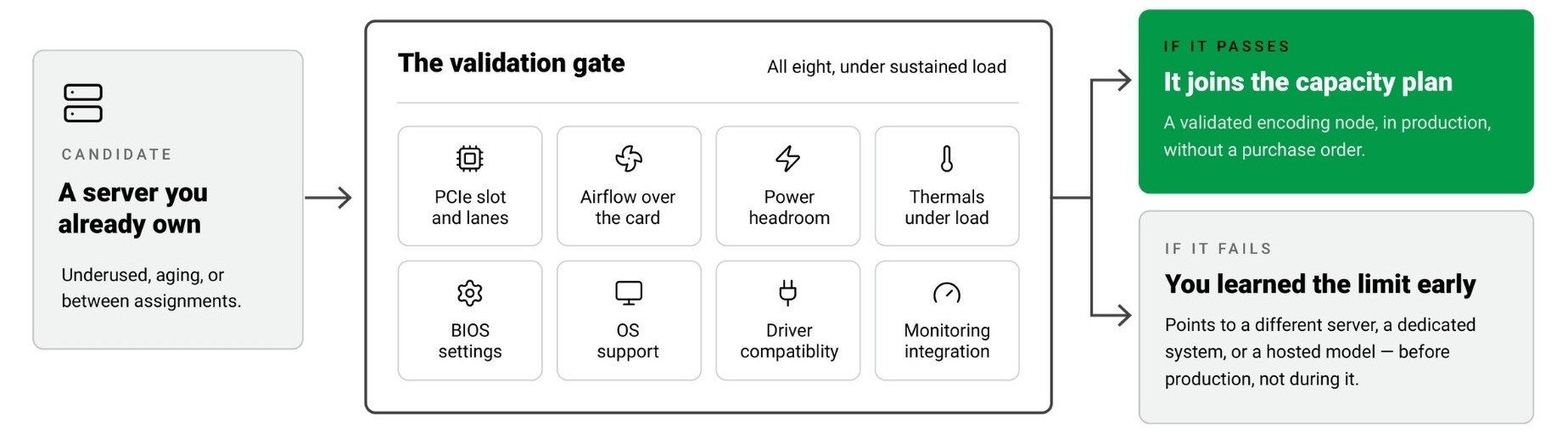
Figure 2. Who owns what. The customer keeps the workflow and the SLAs; the partner carries servers, power, and operations; NETINT provides the processing engine.
Why this matters
New server deployments take time. Budget approval, procurement, installation, validation, and rollout all slow capacity expansion, and that delay hurts when the workload is already growing. Existing infrastructure can sometimes provide a faster starting point.
It will not solve every capacity problem, but it can prove a VPU workflow, support a specific workload, relieve CPU pressure, or bridge a gap while larger plans move forward. It also keeps the discussion grounded in real infrastructure rather than abstract capacity planning. Instead of starting with a large new deployment, a team can start with a focused assessment of which servers are available and technically suitable.
There is also a cost dimension that is easy to overlook. CPU-only encoding consumes power and rack space disproportionate to the streams it produces, so shifting that work to a VPU on an existing host can lower the cost and power impact of the same output. The point is not to glorify old hardware. It is to make a clear-eyed decision about what each system can still contribute before signing a purchase order.
Where a deployment partner helps
Many teams will not want to evaluate this alone. Reuse sounds simple until the details begin: PCIe behavior, firmware, drivers, orchestration, and production monitoring. This is where a systems integration partner such as Arcadian can help assess whether existing servers are suitable, identify technical blockers, and define a path from evaluation to production. For teams with available infrastructure but limited time to validate every detail internally, that role can be the difference between a clean rollout and a stalled one.
There is an old idea behind this approach. You did not throw something away because it was no longer perfect. You looked at it again, repaired what could be repaired, and saved the new purchase for when it was truly needed. Video infrastructure can follow the same logic.
An existing server may no longer suit its original purpose, but that does not mean it has no value. With the right validation and the right video acceleration, selected systems can earn a second life as encoding or transcoding capacity. Before buying more infrastructure, it is worth asking a simple question: what do we already own that can still work harder for us?
Sources & further reading
NETINT, VPU Ecosystem and deployment paths. https://netint.com/vpu-ecosystem/
Arcadian, NETINT VPU integration to cut encoding OPEX (Aug 7, 2025). https://www.arcadian.la/post/arcadian-announces-netint-vpu-integration-to-cut-video-encoding-opex-50
Akamai, Benchmarking VPUs and GPUs for Media Workloads (Aug 19, 2025). https://www.akamai.com/blog/developers/benchmarking-vpus-and-gpus-for-media-workloads
NETINT VPU ECOSYSTEM · IBC 2026
As video workloads continue to grow, adding capacity is no longer a single decision, but a set of practical paths depending on the real bottleneck. This series explores how to scale video processing efficiently using NETINT VPUs, whether through infrastructure partners, existing systems, or dedicated deployments designed around video from the start.
1. The New Video Capacity Problem
2. Three Ways to Add Video Capacity
3. VPU-Powered Capacity as a Service
4. Get More from the Servers You Already Own
5. Build Dedicated VPU-Based Video Infrastructure.
6. VPU Capacity Without a Hardware Cycle
7. Scaling Performance-Critical Video Workloads
Coming soon:
8. Building Practical VPU-Based Video Systems
9. Reliable Live Video Meets Efficient Processing
10. Maximizing Encoding Efficiency in Live Streaming Workflows
11. The Next Layer of Video Efficiency
12. From VPU Evaluation to Production Deployment